





The Only Ripper to Support Both DVD & Blu-ray
 Top Pocks of DVD Decrypters in 2026
VideoByte BD-DVD Ripper: The most powerful tool to convert DVD/Blu-ray discs to more formats without quality loss.
Freemake DVD Ripper: Rip all types of DVDs with Region Code freely.
WinX DVD Ripper Platinum: Ultra-fast DVD ripping software powered by Hardware Acceleration.
When most commercial DVDs are encrypted with different kinds of protection methods, it causes inconvenience when you want to digitalize them for streaming in more flexible ways without requiring a hard drive, or back up to prevent the disc damage. Fortunately, using a DVD decrypter can easily work such a problem out.
Looking for a practical DVD ripping solution, it’s important to pick a tool that fits modern systems and encryption standards. Unfortunately, many older DVD Decrypter are incompatible with Windows 11 and cannot decrypt latest DVD copy protections such as CSS, APS, UOP, and Sony ARccOS.
Don’t worry! Today’s blog has collected the 8 best DVD decrypters performing with reliable functionality to decrypt protected DVDs to regular formats on Windows and MacOS. Now, read more details about them and pick the best one to try (with free DVD decrypter provided)!
Rating: 4.3/5 from Trustpilot
 Pros
Pros
 Cons
Cons
The first recommended DVD decrypter software is VideoByte BD-DVD Ripper. Empowering a strong ability to decode all kinds of encryptions like AACS, Cinavia, APS, etc., the software can rip commercial DVD and Blu-ray files/folders/ISO images to over 300 mainstream formats, and device presets within very simple clicks. It outputs the 1:1 ratio ripped files with lossless quality and original video/audio effects, full subtitles, audio tracks preserved, you will surely get the same great streaming experience after digitalizing your discs.
Despite these, this ripper is also equipped with multiple acceleration technologies, accelerating the DVD decrypting process to 6X faster. And with its built-in editor and toolbox, you are able to easily adjust the video outputs before processing the ripping in this handy DVD decryption software!
(Note: The program is only for non-commercial, personal use and legal DVD backup.)
Features
| Technical Support of VideoByte BD-DVD Ripper | |
|---|---|
| Encryption Support | APS, CSS, ARccOS, CPRM, AACS, BD+, Cinavia, POM Mark, UOPs, Region Codes, etc. |
| Disc Compatibility | DVD/Blu-ray discs, VIDEO TS folders, ISO files |
| Output Quality | SD 480p/576p, 640p, HD 720p/1080p, 4K, 1:1 Lossless |
| Output Format | 14 audio types, 20 HD video types and 26 SD video types |
| Output Devices | Apple, Samsung, Huawei, Xiaomi, Sony, Game, TVs (Check the official website for specific model references.) |
| OS Support | Windows 11/10/8.1/8/7 (32-bit/64-bit), macOS 10.12 or above |
| CPU | Win: 1GHz Intel/AMD CPU or above Mac: 1GHz or above Intel and Apple Silicon processor |
| RAM | 2GB RAM or above |
How to rip a DVD? Following the step-by-step guide or instructional video below:
You can view a quick guide on how to use VideoByte BD-DVD Ripper below:
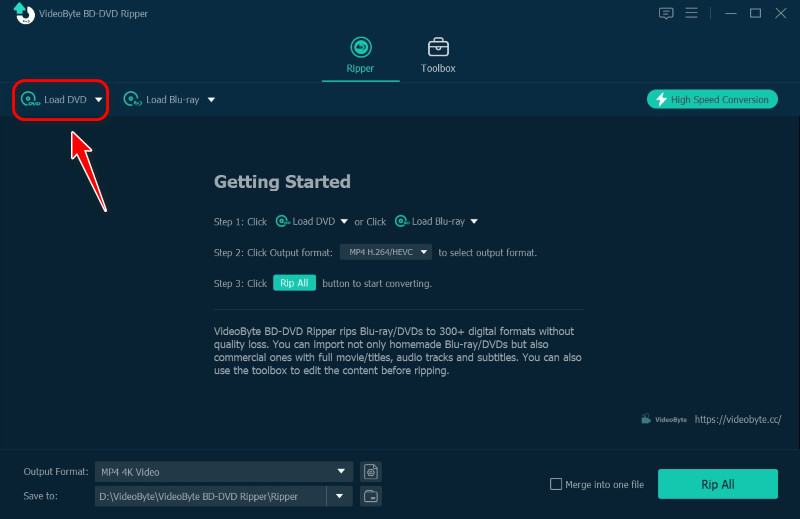
Step 1. Load your DVDs. Click the "Load DVD" in the upper left corner to load your disks.
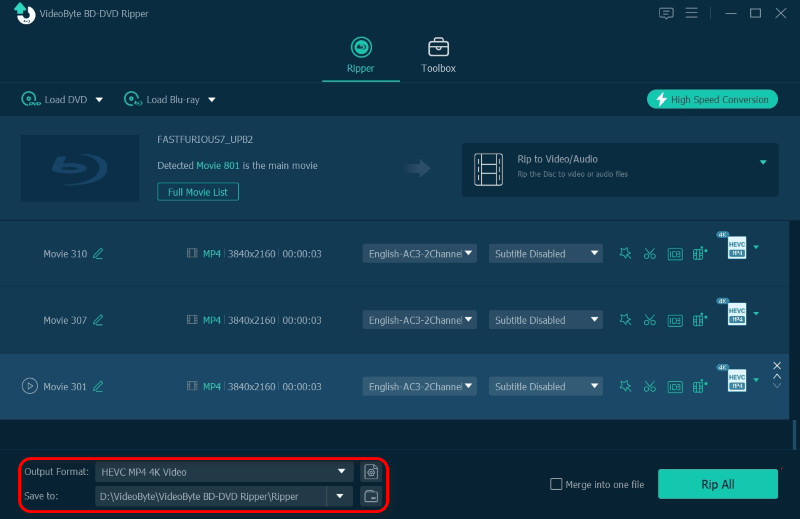
Step 2. Choose the output format and path. Click on the lower left corner to choose the output format you need and the location you want to save to.
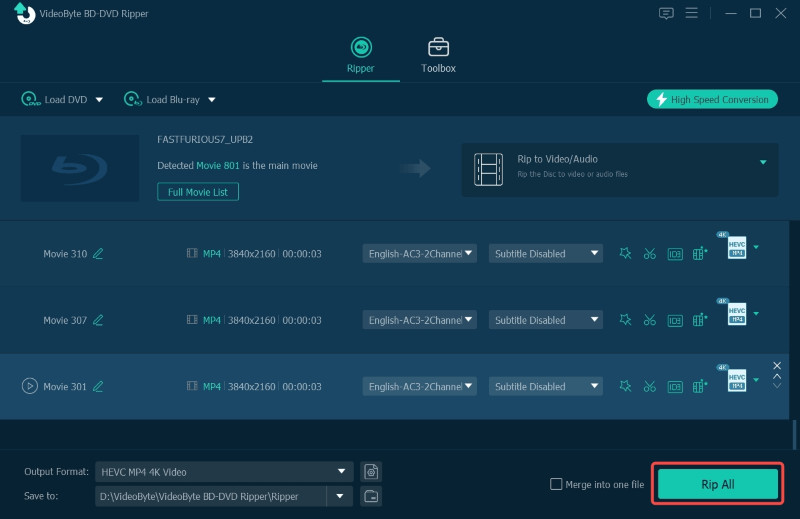
Step 3. Start ripping. After setting details, tap the "Rip All" button to start ripping.
User Review
We tried to rip Disney's encrypted disc with enhanced 99-title in popular DVD decrypters on the market, but most of them returned an error. VideoByte recognized the correct main title within 3 minutes and began ripping while remaining lossless at 1:1 ratio.
Rating: 4.0/5 from Trustpilot
Pros
Cons
Related Article:
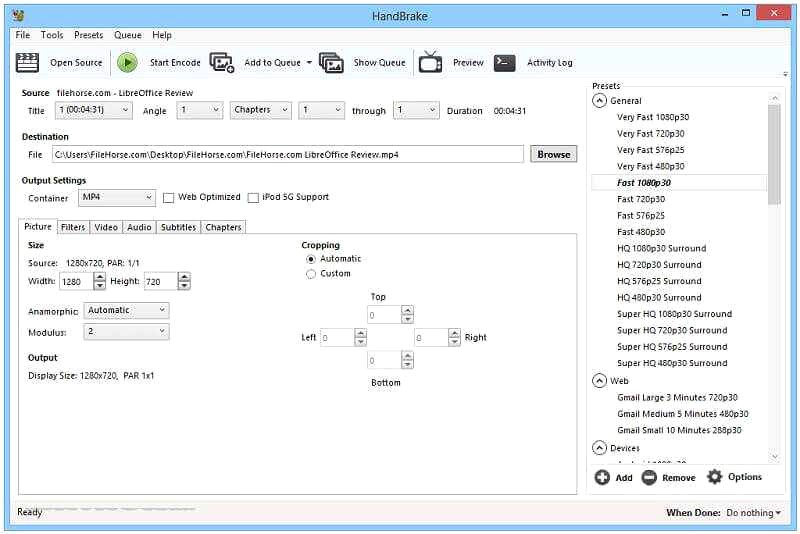
If you desire to decrypt a DVD using a free DVD decrypter without paying, consider Handbrake. It is an open-source software with full compatibility with different device systems such as macOS, Windows 10, and Linux. You only need to go through a simple setup, and it will start the homemade DVD ripping. It offers flexible, customized parameter setting options to let you decrypt DVDs in ways you like. However, you will need to install the libdvdcss file through a bit of a complicated process to activate the protected DVD.
Note that this free DVD decrypter is not as stable as VideoByte. It may report errors during loading DVD/BD-DVD files. Plus, it fails to keep the original video & audio quality from time to time.
 Features
Rating: 3.8/5 from Dealarious
Pros
Cons
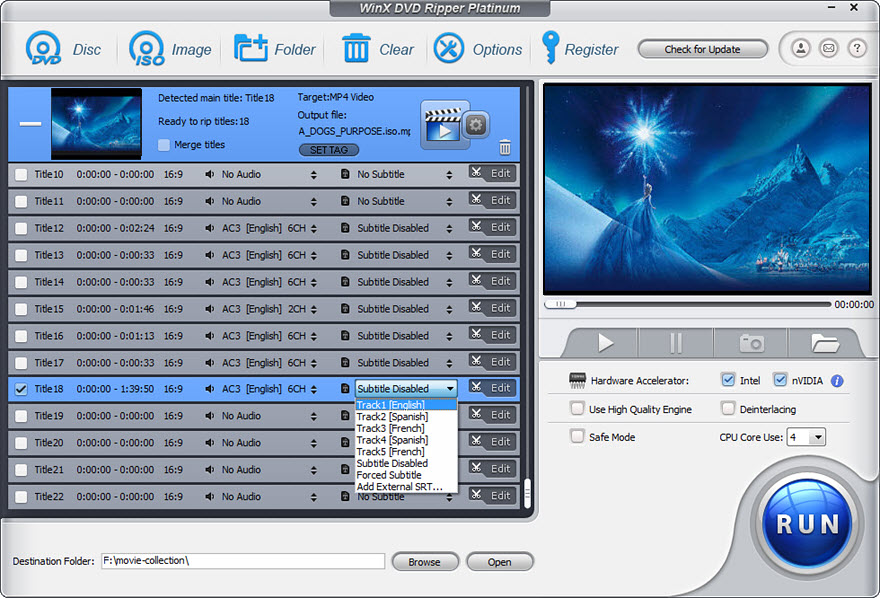
Another best DVD decrypter software you shall not miss is WinX DVD Ripper Platinum, which offers professional functionality to decrypt DVDs and convert the media to general video files without hassle. It provides great compression ability to shrink the media size to 80% smaller but keeps the output effects at a 1:1 ratio, which is still able to deliver you the best streaming experience.
In addition to the physical discs, it is also compatible with ISO, folders, and damaged/99-title discs (subscription required) decryption. Unfortunately, it doesn’t support scanning Blu-ray discs, and it can’t rip files from DVDs to ISO image files as VideoByte does. But it is still worth trying for its smooth DVD encryption experience.
 Features
Rating: 3.8/5 from Trustpilot
Pros
Cons
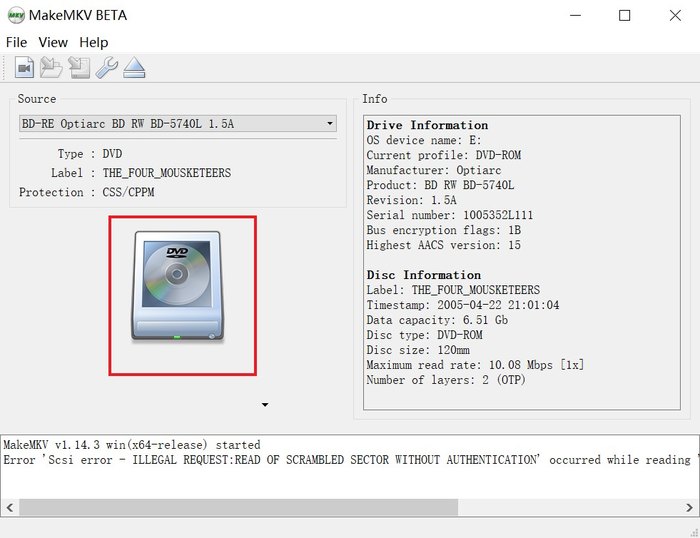
MakeMKV, as its name implies, supports only converting DVD videos to MKV as the only output format. It can handle AACS/BD+ protected Blu-rays and CSS-encrypted DVDs. Then you can convert encrypted DVD videos with lossless quality, including full audio tracks, chapters and metadata. However, the conversion speed is limited only by your drive's read speed, and the ripped files will take up a lot of space on your computer.
MakeMKV has included a free DVD ripping feature in its BETA version, which requires a free key (needs to be updated every 30 days). But you usually don’t get the beta key update on time, so it’s not always guaranteed to be free. If you can't accept the instability, you can choose other MakeMKV alternatives for Windows/Mac.
 Features
Rating: 4.1/5 from CODECS
Pros
Cons
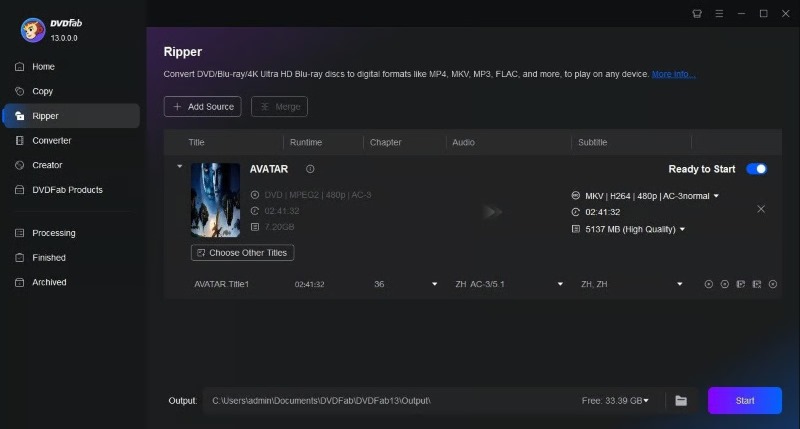
To ensure high output quality in preserving the decrypted DVD media, DVDFab HD Decrypter is another best DVD decryption software you should not miss. This DVD decrypter is able to read commercial DVDs, extract their protection methods and then decrypts to digitalize as regular media files of mainstream formats.
More than anything, it supports extracting ripped files in 4K resolution. For users who desire to have a theatre-like video playback experience on a larger screen after decrypting the DVD discs, DVDFab HD Decrypter is an ideal pick for you to try.
However, you can only use two copy modes, Full Disc and Main Movie. Plus, it does not support converting to MP4, AVI, MKV and other formats (requires subscribing to the DVDFab Converter). Users cannot compress videos or customize output settings, and do not support detailed editing of menus, audio tracks, subtitles, etc.
Tips
This DVD HD decrypter only works with discs released more than one year ago. If you want to decrypt the newly released discs, you should subscribe to its paid version. Here we recommend you to try VideoByte, which can deal with all kinds of encrypted discs.
 Features
Rating: 3.2/5 from Trustpilot
Pros
Cons
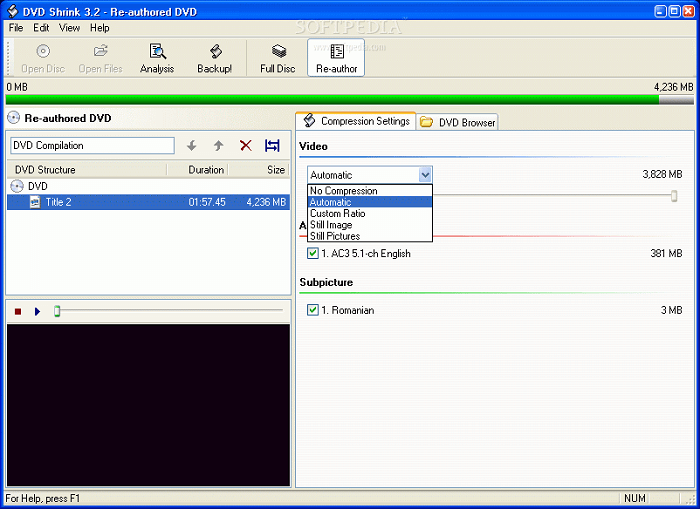
DVDShrink is also a trustworthy DVD decryption software specially provided for Windows users to decrypt DVD easily. It offers a classic but clear interface, enabling users to control the DVD decrypting process without wasting much time. Before the decryption is processed, DVDShrink will provide the video preview for you to check the media at first.
It also comes with customized options to adjust the quality freely as you desire. You are able to instantly check the decrypting process with its live preview mode as well. All in all, DVDShrink is a reliable free DVD decrypter software you can trust.
 Features
Rating: 3.9/5 from Trustpilot
Pros
Cons
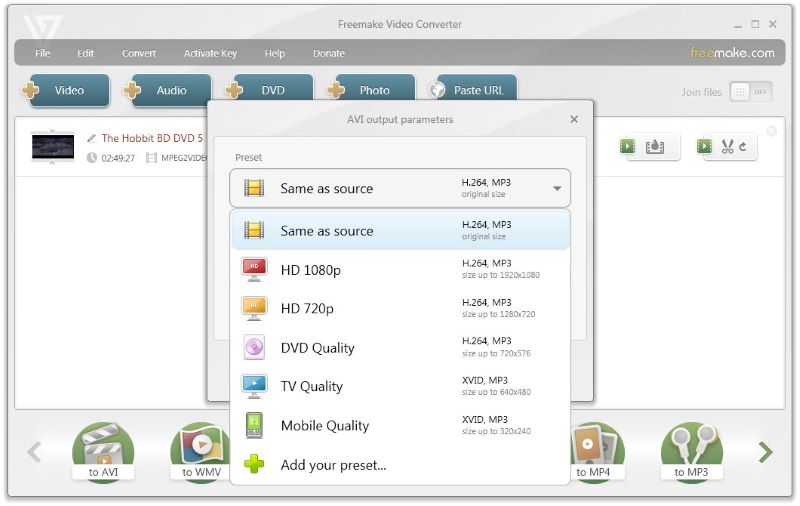
Freemake Free DVD Ripper extracts original files from all disc types (including DVDs, Blu-rays, and DVD folders) to 20+ file formats. With the advanced decrypting teches applied, the software can help decrypt region-locked and copy-protected blockbuster movies with ease. In addition, Freemake Free DVD Ripper is equipped with a built-in editor, enabling you to customize your video clips before ripping conveniently.
Besides, it can even help you directly upload ripped videos to YouTube, websites, and cloud drives. Once getting your favorite video clips ripped from a DVD disc, you can instantly share them online with your friends to enjoy together! By the way, it is not a totally free DVD ripper. Don't mistake this issue by its name!
 Features
Rating: 4.0/5 from Soft112.com
Pros
Cons
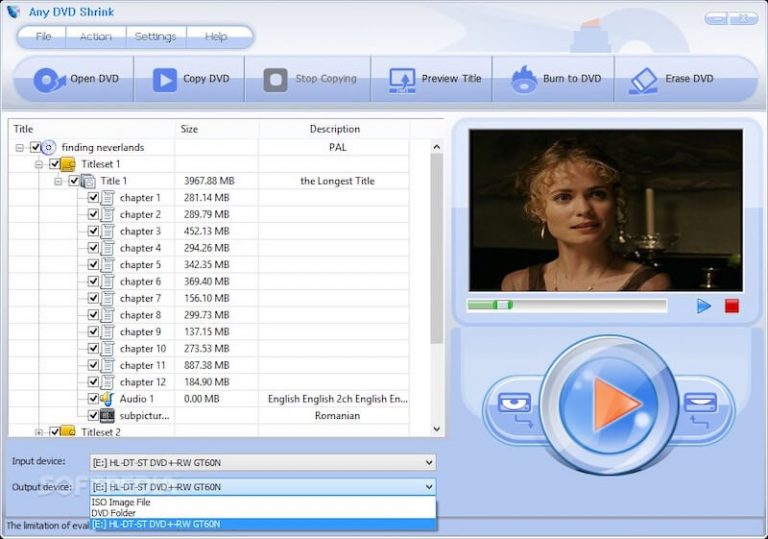
Any DVD Shrink, another best free decrypter for Windows, offers the great ability to decode multiple DVD copy encryption, such as CSS, ArccOS and Region Code, and back up DVD-5, DVD-9, ISO image and DVD folder to other discs or directly on your hard drive. The freeware provides a great ability in DVD compression, which can reduce the size to half of the original one with the least loss of quality, ensuring you a nice streaming experience later on.
You can select to keep or detect all menus, chapters, language tracks, and subtitles, ensuring you have the simplest process and full control to decrypt the DVD. Any DVD Shrink has an intuitive interface for beginners who desire a simple DVD decryption process.
 Features
Note
Features
Note
It's hard to find the official website. Being cautious and identifying the third-party download link to keep your computer from malware and viruses. And this tool doesn’t support ripping Blu-ray discs. If you are looking for a Blu-ray Region Code remover, VideoByte BD-DVD Ripper enables you to decrypt all types of Blu-ray region codes, including Blu-ray region B, A, and C.
| Software | Output Format | Output Quality | Ripping Speed | Encryption Types | Rip Blu-ray | Video Editor | OS | Price |
|---|---|---|---|---|---|---|---|---|
| VideoByte BD-DVD Ripper | 300+ | 4K, 2D to 3D | 6× | APS, CSS, ARccOS, CPRM, AACS, BD+, Cinavia, etc. | ✅️ | Selectable subtitles, audio tracks, cut, crop, rotate, merge, adjust effect, add filter and add watermark | Windows 11/10/8.1/8/7/XP, Mac OS X 10.11 or higher | 1 Year Subscription: $69.95 Single License: $84.95 |
| Handbrake | MP4, MKV | Up to 1080p | Fast | ❌️ | Need libdvdcss to rip some Blu-rays | Customize titles, subtitle, filters | Windows 10 or later, Mac 10.13 or later, Linux | Free |
| WinX DVD Ripper Platinum | MP4, MOV, AVI, WMV, HEVC, MP3, and more. | 480p/720p/1080p | 47× | region code, CSS, Sony ARccOS, & Disney DRM | ❌️ | Select, disable, or add subtitles, extract audio, trim, crop, merge, etc. | Windows 10 (32/64 bit) and lower, macOS X 10.6 or later | Premium License: $39.95 Ultimate License: $65.96 |
| MakeMKV | MKV | 720p | Fast | AACS and BD+ | ✅️ | ❌️ | Windows, Mac OS X and Linux | Free |
| DVDFab HD Decrypter | DVD/BD/Folder/ISO Image File-MKV/MP4 | 480p | Fast | CSS, RC, RCE, APS, UOPs, and Sony ARccOS | ✅️ | Crop, trim, subtitles, merge, etc. | Windows 11/10/8.1/8/7 (64 bit), macOS 10.13 - 15.x | Free |
| DVDShrink | MP4, AVI, MOV, FLV, MKV, etc. | Medium | Fast | DeCSS/Region Code | ❌️ | ❌️ | Windows 9x/NT/200x/XP/Vista | Free |
| Freemake DVD Ripper | 20+ video formats | Up to 4K | Fast | Region Code | ✅️ | Cut, crop, compress, add subtitle | Windows 11/10/8/8.1/7/Vista | Freea |
| Any DVD Shrink | DVD-5, DVD-9, ISO image files, and hard drive folders. | Medium | Slow | CSS, ArccOS and Region Code | ❌️ | Customize titles, chapters, subtitles and languages | Windows 10/8/7/Vista /XP | Free |
A: You are able to check through the comparison chart above to grasp the DVD decryption software available for decrypting Blu-ray discs. If you consider high-quality, stable, fast, and multifunction software with more mainstream formats available to decrypt Blu-rays, VideoByte BD-DVD ripper is an ideal option for you.
A: In the former part of the blog, we have reviewed the free DVD decrypter, Handbrake with details to you. To conclude, Handbrake itself doesn’t provide the function to rip encrypted DVDs. Instead, you are required to install an extra file to process the protected DVD decryption.
A: If you process the DVD decryption only for personal usage and streaming, the action is absolutely legal. But it would turn to be illegal when you use decrypted DVD media to earn profits.
A: DVD companies use different encryption methods. Your decrypter may not work because it can’t handle some strong encryption methods. We recommend VideoByte BD-DVD Ripper, which can decrypt any DVD/Blu-ray protection method that currently exists.
Reading here, the eight best DVD decrypter software has been introduced now. As far as I'm concerned, VideoByte BD-DVD Ripper stands out for its professional ability to handle DVD decryption well in a lossless way and pretty fast speed. Now, simply compare them and select the most ideal DVD decrypter for yourself to process the DVD decryption on desktops without hassle! Take action to try it now!
Hot Articles
by in 6 November, 2024
by in 1 November, 2024
by in 15 September, 2025



 English
  Korean
  Dutch
Dutch  Chinese (traditional)
  Italian
  Spanish