




 Karen Nelson
 29 July, 2026
Burn DVD
29 July, 2026
Burn DVD

Burn Videos to DVDs and Blu-ray Discs Effortlessly
 TL;DR
TL;DR
This post guides you to select the best DVD creator software in 2026 while testing 10 popular tools. For various demands, there are top 3 recommendations for all of users: VideoByte DVD Creator ranks as the top overall choice for its lossless burning quality and compatibility. On a limited budget, Ashampoo Burning Studio is an open-source free option (Windows only) to try basic burning features.
How to store your favorite films, important files, and precious photos forever? A DVD can be your best choice to protect your media files from damage and free your computer’s storage space. If you have no idea how to pick the best one for Windows or Mac, now you can check out the list of the 10 best DVD maker software and get your best pick.

| Best For | Video Quality | Burning Speed | Supported Format | Custom Menu | Edit Video |
|---|---|---|---|---|---|
| VideoByte DVD Creator | 720p/1080p/4K | 6X (~12mins32s) | 300+ | pre-made templates or DIY | Full-featured video editor (trim video, add audio/subtitle, adjust chapters) |
| Wondershare DVD Creator | Original Quality | Fast (~15mins) | 150+ | 100+ DVD templates | Trim, crop, enhance video, add watermark, etc. |
| Leawo DVD Creator | HD | Average (~18 mins) | Common video formats | 40+ templates with customization options | Built-in video editor |
| Aiseesoft DVD Creator | High | Fast (~14 mins) | 300+ | Use free templates or customize | Trim/Adjust/Crop/Watermark |
| BurnAware | Standard | Fast (~15 mins) | Common Formats (MP4, AVI, MKV) | ❌️ | ❌️ |
| DVDStyler | Good (Custom Bitrate) | Slow (~28 mins) | AVI, MOV, MP4, MPEG, OGG, etc. | Flexible Vector / Image Menus | ❌️ |
| WinX DVD Author | Good | Average (~22 mins) | MP4, MKV, AVI, WMV, VOB | Basic Background & Menu Music | ❌️ |
| Ashampoo Burning Studio | Up to 1080p | Fast (~16 mins 27s) | All popular formats | Animated & Static Menus | Basic Video Trimming |
| AnyBurn | Standard | Fast (~15 mins) | Video & ISO Formats | ❌️ | ❌️ |
| ImgBurn | Standard | Fast (~15 mins) | BIN, CWD, ISO, IMG, etc. | ❌️ | ❌️ |
How we test
All data is based on our standardized review conducted in July 2026. We test them on Windows 11 Pro (Intel Core i7-12700, 16GB RAM, NVIDIA RTX 3060), using a drive (Internal LG WH16NS40) to read a 4.7GB DVD-5 disc (Verbatim DVD-R). The test file is a 1080P MP4 video (~3.5GB) without custom menu rendering delay.
Note: Actual burning performance may vary depending on your computer's CPU/GPU acceleration, video resolution, disc type, and menu complexity.
• Brief Summary: Best DVD Creator of 2026 for an all-in-one solution.
| Operating Systems | • Windows 10/8/7/Vista/XP • Mac OS X 10.5 or above |
| Pricing Plans | • 1 Month Subscription: $24.95 • Single License: $49.95 |
VideoByte DVD Creator ranks as the top DVD maker software for both Windows and Mac, gaining widespread popularity. It enables you to burn videos onto DVDs with a fully customizable menu. Additionally, numerous dedicated menu templates are available in various categories, including wedding, family, and travel.
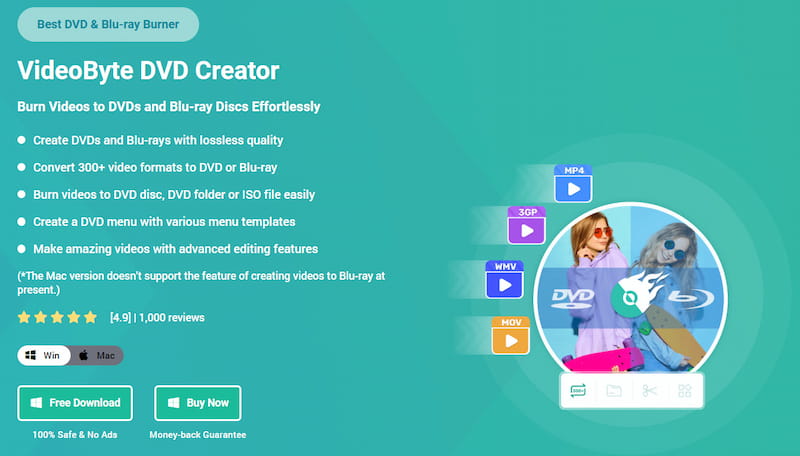
Meanwhile, you can clip, crop, or add effects to the videos with a real-time preview. You can also adjust the brightness, saturation, hue, and contrast to create your own amazing movies. Moreover, VideoByte DVD Creator allows you to add subtitles or audio tracks to the DVD as needed. You can also merge, split or set unique thumbnails for chapters. By using this best DVD creator program, your work of art is on its way.
• Various Input Formats – Support 3D videos and videos in MP4, AVI, 3GO, MKV, MOV, MPG, NSV, etc.
• High Quality – Burn high-resolution videos from 720p to 1080p, and even 4K.
• All Disc Type Included – Support blank discs like DVD-5, DVD-9, DVD-R, DVD-RW, DVD+RW, etc.
• More Output Choices – Create DVDs, Blu-ray discs, DVD folders, or ISO image files with lossless quality.
• Rapid Creation – Boost the DVD creation process at a stable and fast speed to save a lot of time.
 Pros
Pros
 Cons
Cons
Now, let’s see how VideoByte DVD Creator works.
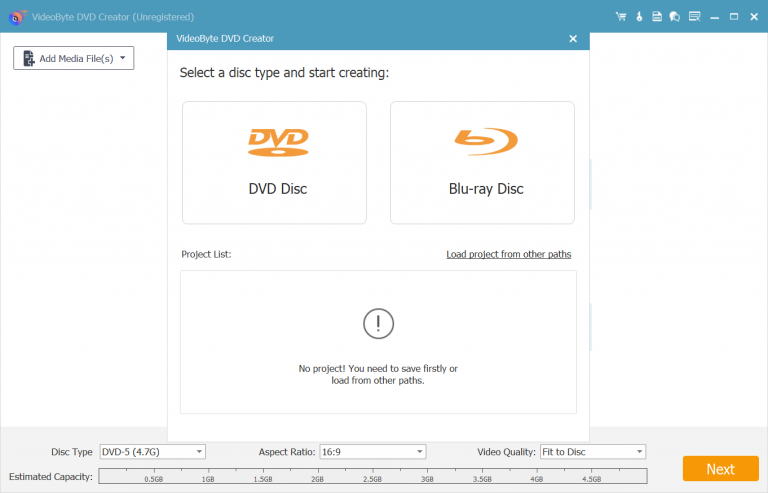
Step 1. Download and install VideoByte DVD Creator on your computer. launch it and insert a blank DVD disc.
Step 2. Select "DVD Disc" > "Add Media File(s)" to input your desired videos, and click “Next” to proceed.
Step 3. You can use its built-in video editor to edit your videos. When done, click "Apply" to go on.
Step 4. Here you can add audio tracks or subtitles to the videos. Also, click "Apply" to the next step.
Step 5. Design your DVD menu with default or custom templates. Now, click "Burn" to align the videos, or use video tools/chapter tools for further processing. When ready, click "Next" to start creating your DVD.
User Feedback
Mircea Dragomir, the pro editor on Softpedia, reviewed, “VideoByte DVD Creator is an application which enables you to create cool video DVDs containing local or downloaded clips, and options to create neat menus.” During my test, I took a 1080p HD movie to see how it handled a real workload. The transcoding took just over 12 minutes. I noticed there is an official watermark on the burned disc, well, if you mind this, you have to upgrade to Pro version. A user on Reddit said, “…need to make the data video files to DVD files first. I have tried VideoByte and can make data files to DVD files, then burn them to discs. All very simple without error.” YES, the quality of DVDs is flawless without laggy loading or out-of-sync sounds.
• Brief Summary: Popular DVD creator as well as a video converter.
| Operating Systems | • Windows 10, 8, 7, XP, Vista • Mac OS X 10.7 or later |
| Pricing Plans | • 1-Quarter License: $29.95 • Perpetual License: $59.95 • Multi-User License: $90.95 |
Wondershare DVD Creator is one of the best DVD creator software options, offering a quick burning speed, user-friendly functions, and numerous customization settings to help Windows and Mac users burn videos to DVD in a professional manner. It even offers backup and restore functions to prevent sudden crashes and other errors that can lead to data loss while you are creating a DVD.
Wondershare DVD Creator supports over 150 formats of input video files and allows users to burn them to various discs or files, including DVD/Blu-ray discs, folders, and ISO images. It is an excellent video converter and DVD creator.

However, after testing, it somehow fails to display the menu and chapters when playing the DVD, which is very frustrating.
Limitation
I want to put encoded MP4 files on a separate DVD with a basic menu that won't make the size way beyond what a DVD can fit. But on Wondershare DVD Creator, it says the end file size is gonna be 8.35 GB. Too large! What’s more, I found that the colors of my HDR video get washed out…If you are a music lover, this tool is also suit for you: It can’t burn audio files onto DVDs.
• Brief Summary: Best 3D DVD maker software.
| Operating Systems | • Windows 7/8/8.1/10/11 • macOS X 10.13 or higher |
| Pricing Plans | • 1-Year License: $29.95 • Lifetime License: $39.95 |
Leawo DVD Creator is also one of the best DVD creators on the market. It supports converting videos in AVI, MKV, MP4, MPG, MPEG, FLV, 3GP, WMV, ASF, RM, RMVB, and other formats to DVDs. With its default video editor, you can clip or crop videos, or add effects, texts, and watermarks to them. At the same time, it allows you to adjust the details like brightness, saturation, and contrast. Additionally, Leawo DVD Creator provides over 40 presets to easily create a DVD menu, and you can also customize your own menu with pictures and templates.
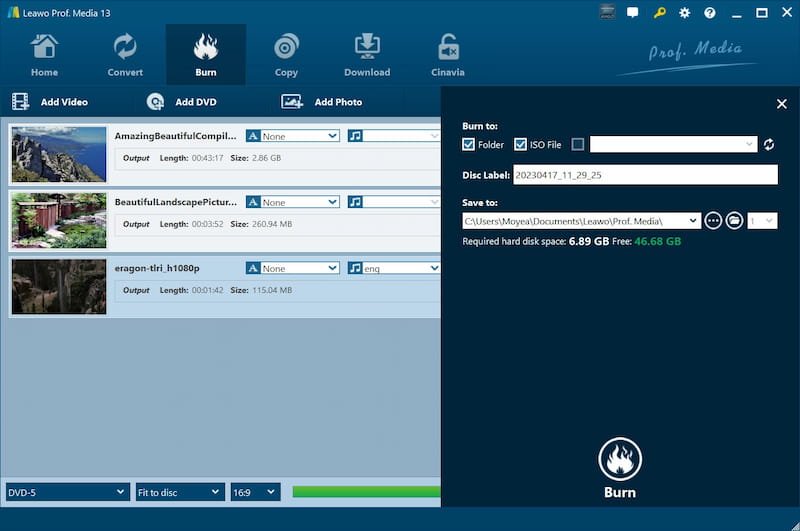
Though it can convert 2D videos to 3D as well, the visual experience is not as good as expected. Additionally, since this DVD maker software only supports VD-5/DVD-9 discs, please ensure that you are not using a disc that it can’t support, as the burning process will fail.
Notes:
I noticed that Leawo supports DVD-5/DVD-9 discs only. It does not support Blu-ray or 4K UHD disc formats. If you’re planning to burn an HD Blu-ray disc, this tool will give you an error of invalid disc directory please choose another directory…Don’t buy the wrong disc, which may cause burn failures.
• Brief Summary: Professional DVD creator software, but can only create DVDs.
| Operating Systems | • Windows 11/10/8/8.1/7/Vista/XP • Mac OS X 10.9 or higher |
| Pricing Plans | • 1-Month License: $12.45 • Lifetime License: $39.96 • Business License: $69.96 |
Aiseesoft DVD Creator is a professional DVD maker designed for both Windows and Mac users, offering speedy functions that enable users to easily burn videos, audio, and images to various formats, including DVD discs/folders and ISO files, without compromising quality.
Also, with its customizable menus and video editing features, Aiseesoft DVD Creator enables users to create DVDs with ease. You can also add subtitles and audio tracks for each video. Thanks to its accelerated burning, the entire process is completed quickly.
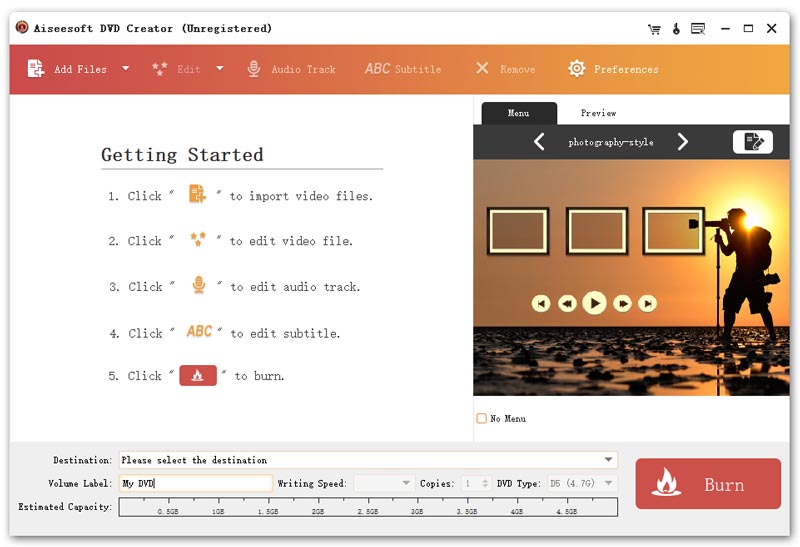
The pity is that you’ll enjoy limited features with its free trial. For example, it doesn’t allow users to create Blu-ray discs, folders, or ISO files. To unlock all functions in this DVD creator, you will need to purchase its subscription plan and register the premium version.
Pros
Cons
Expert Insights:
A Data Analyst at Worldmetrics Tatiana Kuznetsova reviewed the software, which builds standard DVD-Video discs and supports menu creation plus chapter and preview customization. But template-based menus and editing tools are basic compared to full video editors.
• Brief Summary: Easy-to-use, free DVD creator software friendly to beginners.
| Operating Systems | Windows 7/8/8.1/10/11 |
| Pricing Plans | • BurnAware Free: $0 • BurnAware Premium: $29.95 (yearly) • BurnAware Professional: $39.95 (yearly) • BurnAware Premium: $89.95 (lifetime) • BurnAware Professional: $99.95 (lifetime) |
If you want to find a free DVD creator software to burn DVDs without any cost, BurnAware can be a good choice, as it offers a free edition. This versatile DVD maker enables Windows users to burn audio, videos, files, and folders to various disc types, including DVDs, CDs, M-Disc, and Blu-ray discs. The interface is clean and intuitive, making it easy to get started. Meanwhile, it lets you erase a disc or recover data from a malfunctioning disc.
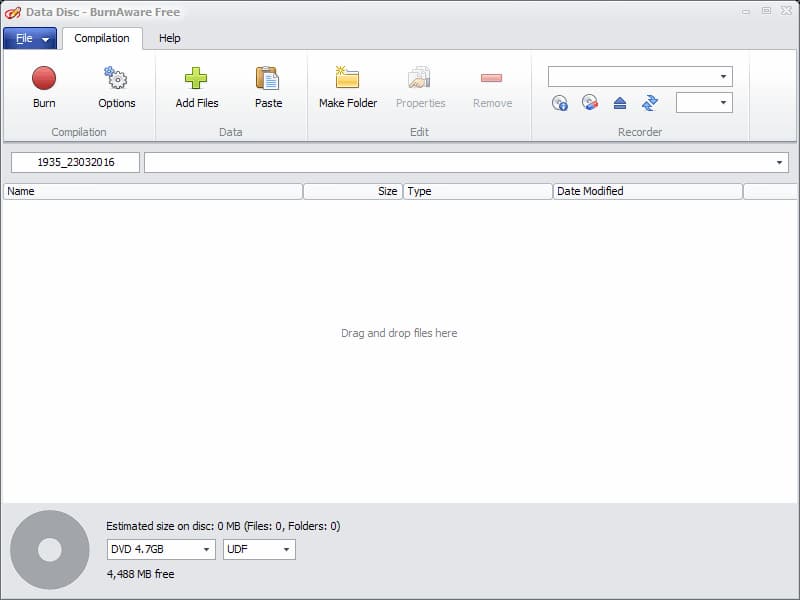
However, versatile as it is, this free DVD burning software lacks creativity. BurnAware doesn’t allow you to edit your videos or make a custom DVD menu. If you’re looking for a professional DVD creator with advanced menu customization or additional editing functions to create a thoughtful gift, this may not be the best choice. Just like most ad-supported products, it attempts to download and install third-party tools by default. Don’t rush through the setup if you wish for a clean installation.
Pros
Cons
• Brief Summary: Free DVD Creator for all operating systems.
| Operating Systems | • All Windows systems • MacOS X 10.15 or later • Linux |
| Pricing Plans | Free |
As a free DVD burner for Mac, Windows, and Linux, DVDStyler offers quick video-to-DVD burning services, allowing you to easily create your own DVD discs. It offers selectable menu templates, thus you can create discs in various styles with just one click. Additionally, this DVD creator software ensures high compatibility, allowing you to burn videos in any popular format, such as AVI, MOV, MP4, MPEG, OGG, and WMV, to DVD discs without limitations.
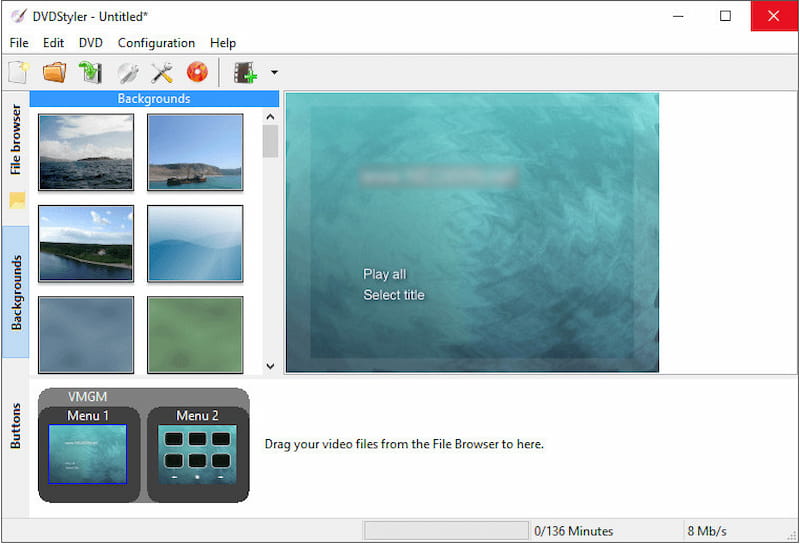
In addition to these basic features, DVDStyler offers simple editing functions, such as adding subtitles and audio tracks to your burning DVDs. Moreover, it lets you make a slideshow of photos instead of videos.
Pros
Cons
Testing Experience
Among those free DVD makers, for adding your own images, use DVD Styler. I just finished setting up all 6 episodes of Villanos with a perfect menu with it. However, it is a pity that this DVD maker software cannot help adjust video effects. Instead, you need an extra editor to do it in advance. If you pay close attention to DVD editing before burning, VideoByte DVD Creator can be a better choice.
• Brief Summary: Free DVD creator software for Windows 10/11 only.
| Operating Systems | Windows 10/11 |
| Pricing Plans | Free |
Another DVD creator freeware you can try is WinX DVD Author, which provides free and easy-to-use DVD burning services for Windows 10 and 11. The software enables videos to be saved in lossless format, ensuring the optimal quality for DVD playback.
WinX DVD Author can convert videos to VOB files smoothly and collect them to create a complete DVD with menus applied. It also supports downloading videos from YouTube, allowing users to save their favorite videos from YouTube to a DVD.
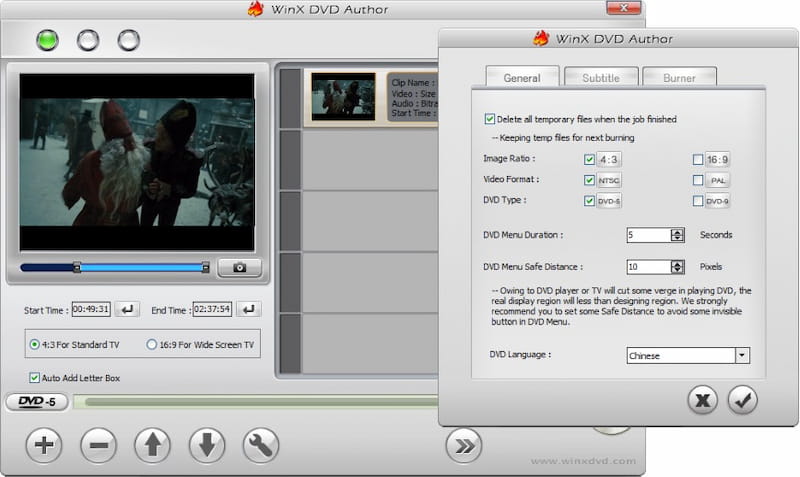
However, since WinX DVD Author supports only limited device systems (Windows 10 and 11), if you are using other Windows systems or Mac computers, you will need to find a highly compatible DVD creator, such as VideoByte DVD Creator, to assist you.
Pros
Cons
As a free tool for Windows, it can handle quick drag-and-drop video-to-DVD conversions. But note that it may be outdated because it has ceased updating since 2019.
• Brief Summary: Free burning software for Windows with fewer editing features.
| Operating Systems | Windows 11, 10, 8, and 7 (32- and 64-bit) |
| Pricing Plans | Free |
As a free DVD creator software, Ashampoo Burning Studio provides various functions within a single application. From burning videos to DVDs, to ripping audio CDs, data discs, video discs, and Blu-ray discs, this DVD creator freeware can do it all for you. It also sets the password-protect function to let people lock their data or disc up to keep the content safe.
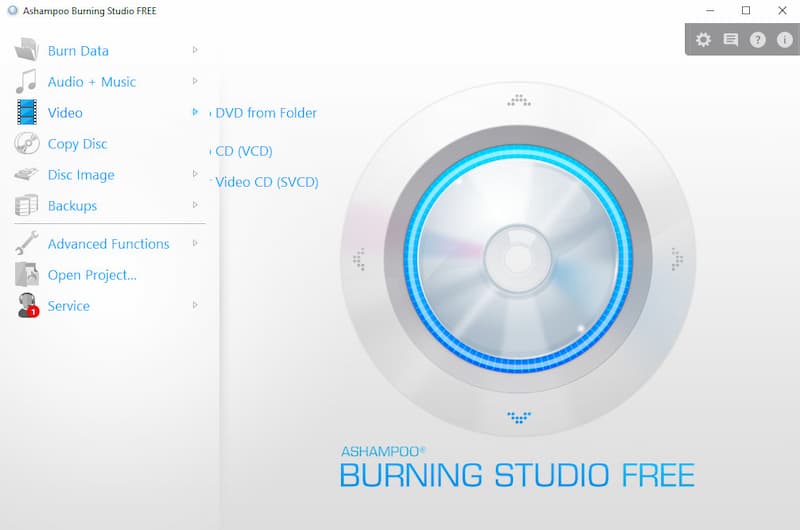
You will find Ashampoo Burning Studio to be a powerful tool that can meet your needs. The caveat is that it focuses mainly on burning rather than creating DVDs. Therefore, it doesn’t let you edit videos and create a personalized DVD menu. If you want to create themes to make your DVDs more vibrant or special, Ashampoo Burning Studio may not be the best option.
Pros
Cons
User Review
“When I insert a DVD-R (Memorex, new out of the box) burned with Ashampoo (version 6 Free) on a laptop running Windows 7 (32-bit) into the DVD player connected to an analog TV, the screen displays an error message…I then try the same with a different DVD player connected to a different analog TV – same results. I then burned a Phillips blank DVD with Ashampoo and followed the same process – same results.” –from AnandTech Forums
• Brief Summary: Free DVD creator for Windows OS, which supports creating bootable USB drives.
| Operating Systems | Windows 11/10/8.1/8/7/Vista/XP/2008/2003/2000 |
| Pricing Plans | Free |
AnyBurn is also an easy-to-use DVD creator specially designed for Windows users. It provides smooth performance and is equipped with acceleration technologies to ensure fast DVD creation, without wasting much of your time burning videos onto a DVD disc. What makes it unique is, AnyBurn allows users to create bootable USB drives from ISO files. If you want to reinstall your operating systems or require multimedia storage, AnyBurn could be the best choice.
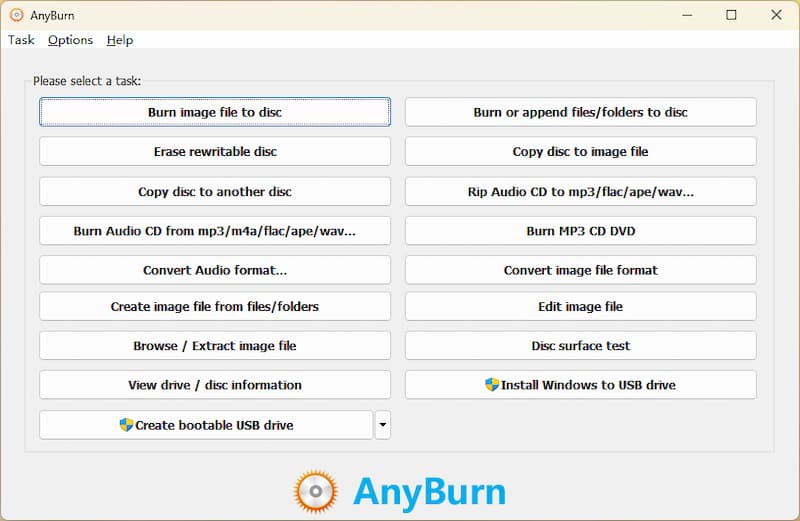
However, as you can notice, AnyBurn doesn’t provide many editing or menu customizing functions. So, if you need to personalize your DVD disc to be more vivid, this is not the best DVD maker software you consider. Instead, all-in-one professional tools like VideoByte DVD Creator are a better choice to try.
Pros
Cons
After using AnyBurn for a while, I found that it gets system crashes from time to time. When I tried to burn a CD-R and add FLAC files to the program. The program would show me the [adding files[ pop-up window and then just freeze and say (not responding), and it would stay like that for like forever. Well, I can only reboot the burner and try it again…
• Brief Summary: Classic but a little outdated Windows DVD creator difficult for new users.
| Operating Systems | Windows95/98/Me/NT4/2000/XP/ 2003/Vista/2008/7/8/10 (including all the 64-bit versions) |
| Pricing Plans | Free |
The final recommended DVD creator software is ImgBurn. This is a freeware program designed for Windows users, compatible with almost all Windows OS versions.
It can help you generate DVDs from files or images. It also supports buffer underrun protection and configurable write and read options for disc drive compatibility. Mostly, it stands out for producing optical media with a detail-heavy workflow instead of guided steps.
And also, that’s why the interface appears somewhat outdated…it relies on technical settings, which is overcomplicated for beginners. This DVD creator is more suitable for professionals and advanced users.
Q: How to burn MP4 to DVD without losing quality?
A: You need to convert your file into the standard MPEG-2 format at a high bitrate and choose a DVD-9 disc for long or high-bitrate MP4 to avoid compression loss. Then you can use a DVD-making tool like VideoByte DVD Creator, which provides high-fidelity encoding based on your disc space. Besides, slow burning can minimize writing errors.
Q: What is the best free DVD creator software for Windows 10/11?
A: If you want software designed especially for Windows, you can choose WinX DVD Author, which is best for home users to author DVDs with basic menu and chapter controls. You can burn a video file into standard DVD formats. But this DVD authoring software is for straightforward home-movie creation rather than an advanced editing workflow. If you don’t need to create a professional-looking DVD menu, a free tool can assist you.
Q: Why did my DVD burning fail and how to fix it?
A: Common issues are caused by unsupported input video codecs, insufficient disc capacity, optical drive firmware issues, or outdated hardware acceleration. Make sure that you have DVD creator software with full codec support and GPU acceleration features to offload the encoding workload. For large files, switch to a DVD-9 disc or enable "Fit to Disc" compression.
It is hard to make up your mind, isn’t it? As all DVD creators have their pros and cons, you need to select the best one based on your needs. To make a dedicated DVD gift, VideoByte DVD Creator must be on your wishlist. This professional DVD maker software allows you to create high-resolution videos for DVD with a fully customizable menu. Additionally, you can beautify the videos with its built-in video editor and set chapters to organize your videos. Now, give it a shot, and your amazing DVD is ready to be born.
Hot Articles



 English
  Korean
  Dutch
Dutch  Chinese
  Italian
  Spanish